
Recommended Resources
Browse from our selection of recommended resources for supporting SEND in primary schools below.


Devon Council – Using Ipads: Special educational needs and disabilities (SEND)
Extensive list of recommended apps to support SEND Learners from specific fine motor intervention, handwriting, reading, organisation, zones of regulation, behaviour and sensory needs, writing, literacy and numeracy skills.
Tip: Try placing the iPad on a slope to encourage good posture.
*All details accurate at the time or writing – please note that app prices do change, apps do get removed from the app store and iOS updates can stop apps from working correctly
— Devon County Council

LGfL – 5 Ways Inclusion Resources
The aim of ‘5 ways’ is to showcase five ways to use LGfL resources across the curriculum that you can take and use and share.
They can be shared in the staff room, or within an INSET session.
— London Grid for Learning
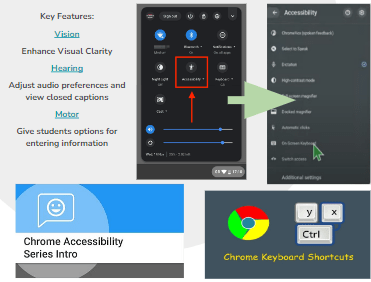
Accessibility for every student
Chromebooks include accessibility straight out of the box, unlocking learning experiences for students with diverse needs, abilities and learning styles. Built-in settings and easy-to-use apps and extensions help customise the learning experience to include and engage every student.
— Google & King’s Cross Academy

Included Edu
Our innovative FREE framework tool lets you put the needs of your learners first! Having identified your learner’s individual needs, you can follow our Framework. It is a simple step-by-step process that will provide you with a bespoke menu of ‘Assistive Tech’ tools, to help include all learners. Each tool page contains a demonstration video, top tip, case study and relevant link to ensure you can facilitate personalised learning in your fully inclusive classroom or home environment.
— Included Edu
 Islington Computing